Contoh kursus7 menit
Reading a lesson in the margin
A sample lesson that uses every reading component, so the design system can be checked in both themes and on every screen size.
Pelajaran ini hanya tersedia dalam bahasa Inggris. Antarmuka halaman tetap dalam bahasa Anda.
Why the margin matters#
A good technical book explains the idea in the main column and keeps the asides close by: the why, the caveat, the trade-off. Courses does the same. On a wide screen the notes sit in the margin beside the paragraph they belong to; on a phone they appear right after it.
Margin notes hold short context. Anything longer belongs in the main text.
Inline code such as Array.prototype.reduce and links to the MDN reference use the same reading rhythm as the prose.
Code with callouts#
Numbered callouts tie a line of code to a note in the margin, so the explanation stays next to the line it explains.
export function debounce<T extends unknown[]>(fn: (...args: T) => void, wait = 200) { let timer: ReturnType<typeof setTimeout> | undefined; return (...args: T) => { clearTimeout(timer);1 timer = setTimeout(() => { fn(...args); }, wait);2 };}Every new call cancels the pending one, so only the last call in a burst runs.
wait defaults to 200 ms, which is about how long people pause between keystrokes.
Callouts#
Catatan
A note adds context without interrupting the explanation.
Run it yourself
Paste the function into your browser console and call it several times in a row.
Peringatan
A debounced function returns nothing useful: its result arrives later, if at all.
Debounce or throttle?
Debounce waits for quiet; throttle runs at most once per interval. Search boxes usually want debounce, scroll handlers usually want throttle.
Comparing approaches#
Debounce
- Runs once, after the calls stop
- Good for search-as-you-type
Throttle
- Runs at a steady rate while calls continue
- Good for scroll and resize handlers
Diagrams#
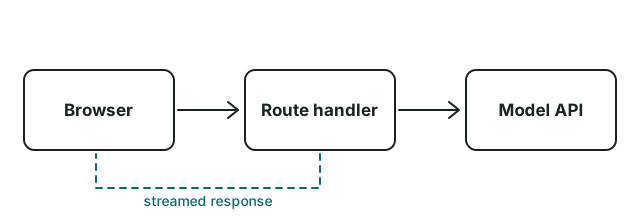
Video#
Diputar dari YouTube dalam mode privasi yang ditingkatkan. Tidak ada yang dimuat sebelum Anda menekan putar.Tonton di YouTube
Transkrip
The transcript sits under the player, so the lesson still works when the video can't be watched.
Practice#
LatihanCancel a debounced call
Add a cancel() method to the debounced function that clears the pending timer.
Tampilkan solusi
Return the inner function with a cancel property that calls clearTimeout(timer).
Tantangan koding untuk pelajaran ini akan hadir nanti.
| Approach | Runs | Typical use |
|---|---|---|
| Debounce | After the calls stop | Search input |
| Throttle | At most once per interval | Scroll handler |
The best explanation is the one the reader can repeat in their own words.
- Read the explanation.
- Run the example.
- Change one thing and predict the result.